Monday, 21 October 2013

ThinkPad Yoga - The Newest Addition to Lenovo's Convertible Ultrabook Series

When Lenovo first released its first IdeaPad Yoga Ultrabook, there was nothing else on the market like it. Instead of having a detachable or wireless keyboard accessory if you wanted a notebook typing experience, you just flip the screen over.

A year later, Lenovo brings this revolutionary technology to their ThinkPad line of Business oriented mobile PCs. From day one, the biggest complaint with the original Yoga was that the user was still mashing keys on the keyboard while in tablet mode. Lenovo has addressed this uncomfortable issue with not the best solution, but still one that does the job well. What they had done is that they motorized the frame around the keys. Meaning, when the screen is flipped around, frame will rise up and sit flush, aligned with the keys. Then, a lock clamps the keys in place so you can't press them even if you tried. Lastly, little feet pop out between the keyboard and the surface you're placing the device on for extra grip so that the device does not slide all over the place.


As expected from the ThinkPad line of products, the fit and finish of the device is exceptionally high. Because of the new keyboard design, Lenovo has had to fit a stronger hinge, and a larger chassis, meaning that unfortunately, this feature will not make its way into the Yoga 2 Pro. That being said, the Yoga 2 Pro will still get its set of new upgrades.


The device is still loaded with the usual ThinkPad bells and whistles in terms of specs and features. A 1920x1080 display for that Full HD experience, up to an Intel Core i7 Processor to drive productivity levels, high security connectivity options, and optional touch pen accessory, the ThinkPad Yoga is a seriously flexible convertible Ultrabook for the business professional on the go.


Sunday, 13 October 2013

Google invading Windows 8


Google has recently launched a new version of Google chrome for developers that has a new layout when you run Google Chrome in Windows 8 app mode.
This version basically has a Chrome OS layout, which you can say, it is a Chrome OS since this platform is build on top of a browser, running everything in the "cloud".

 When you are using this, you can have 80% of the user experience as a Chromebook user. You can feel what you can do with it, and pretty much a lot you can't. Personally, I am sure i cannot live with that thing, maybe only because I am not an intensive Chrome apps user. As you can see I don't have much apps installed. And when I am running this on a Windows tablet, it is a complete nightmare.


So now lets dive into this "OS". You have a toolbar that includes an app launcher, Chrome apps that you can pin on it, and a clock. That's it, everything you have.
There are a few limitations and differences between an actual Chrome OS. You cannot set a wallpaper in this layout, and you cannot make any change to the system. That's why you cannot find icons like wifi and other stuff that you could expect in a Chrome OS.


Multitasking was great with this "app". You can make use of the split screen function that Windows 8 provide, and the multi-screen inside the chrome app itself. This breaks through the limitation of having two tasks on screen at the same time. You can have multiple screens doing different work and an app sized big or small .


If you want to try this interface of google chrome app click "HERE" and click Dev channel for windows to download it. After you had download it, set it to your default browser and have fun.


Wednesday, 2 October 2013

Windows 8.1, The Anticipated Upgrade

The iconic Windows 8 Start Screen with Modern UI
October marks the one year anniversary of Microsoft's game changer Operating System, Windows 8. The month also marks the release of Windows 8.1, formally known as Windows Blue. The precise dates as as follows:

October 17 - Free update for current Windows 8 users through Windows Update

October 18 - Available for purchase through retail or pre-installed on a new PC.

The Start Button makes its return
Probably the most talked about change is the return of the start button. But just to be clear, this is just the Start Button. The Start Menu we all know and love all the way from Windows 95 to Windows 7 unfortunately doesn't a return. However, this is still a major improvement. Particularly for touch screen users because this allows easier access to the Start Screen. With the original Windows 8, Microsoft left less than a centimeter of space between your first application on the task bar and the edge of the screen. This quirky placement mated with many manufacturers building thick bezels around touchscreens made trying to get to the Start Menu almost impossible half of the time. Thus forcing users to either through either the Charms Bar or the Start key on the keyboard to get to the Start Screen. Now with a more definitive object to press, this ongoing problem has been solved without the use of third party software.

 
The new 8.1 Start Screen
Another key feature of this update is the tweaks Microsoft has done to the Start Screen. With 8.1, users can now personalize their own Start Screens even more to their liking with more tile sizes and the ability to name groups of applications. Other features like having the wallpaper be displayed as the Start Screen background has been implemented. The master list of applications has been re-organized and separated between Start Menu apps and desktop applications.


Reviled first in Windows 8, the split screen function is finally designed to be usable in a productive manner. The problem with the original implementation was that Windows 8 apps or the desktop was only given a set amount of space if they we. And this reserved portion barely took up even a quarter of the page. Any attempt to extend this space would either cause the content to be minimized or extend across the entire screen.
With 8.1, users are not only given more space by default, but several different size options to choose from. Thus making far more possibilities of this feature used for productivity.

Some more tweaks including the ability to go straight onto the desktop on start up rather than going to the Start Screen were included. Overall, Windows 8.1 is not an entirely new operating system. Rather, its just like those old service packs Microsoft offered in XP, Vista, and 7 but named differently. That being said, as a current Windows 8 user, these really should have been features that were incorporated in Windows 8 when it first came out back in 2012.

Groups can now be named for better organization 


Monday, 30 September 2013

Apple's iPhone 5s Touch ID hacked

In less than a week after the release of the iphone 5s, it's most unique and claimed to be very secured Touch-ID was defeated by a group of German hacker group known as Chaos Computing Club (CCC) by using easy everyday means.

"In reality, Apple's sensor has just a higher resolution compared to the sensors so far. So we only needed to ramp up the resolution of our fake", said the hacker with the nickname Starbug, who performed the critical experiments that led to the successful circumvention of the fingerprint locking. "As we have said now for more than years, fingerprints should not be used to secure anything. You leave them everywhere, and it is far too easy to make fake fingers out of lifted prints." a post on the CCC website said.

Apple claimed the Touch ID would be very secured and users can use this to get access to the App store, using it instead of a password. But is it actually that secure to use such thing that can be found everywhere to protect your personal data, and for the most important, your money. It may be convenient for a user to be identified by their fingerprint, but it will never be as secured as a long complicated password. You may say, both of them could be hacked, but lets think about it, are there actually any technology hackers cannot hack? It's just a matter of time.Normal user may not be interested in spending hours to get your fingerprint and get access to your iphone, but this tells us that biological identification system was not as secure as you imagined. The Touch-ID was not extremely secured, but it is much secure than a 4 pin password.


Source:

PC Magazine

Chaos Computer Club

Friday, 27 September 2013

Microsoft Surface Gen.2 to Roll out Next Month

Pretty much a year ago, Microsoft released their very own Windows 8 based tablets to the market. The original Surface and Surface Pro never gained much popularity among the generation public. Although the Surface was priced competitively with immensely successful Apple iPad, the Windows RT OS paired with Nvidia's Tegra 3 processor was a bit of a jerky mess and the App library was extremely limited. The battery life was not impressive as well. In fact, it was dreadful compared to competitors like the iPad, the Acer Iconia Tab, the Google Nexus 7, and the Lenovo IdeaTab.


Available through Microsoft Stores on October 22 of this year, Microsoft's improved Windows RT Surface is boasting the new updated Tegra 4 processor which is to improve graphics, CPU performance and a longer battery life. Other upgrades also include a two angle kick stand as opposed to the single setting in the first generation, a slimmer shell, and an upgrade to the same 1920 x 1080 (Full HD) display as seen in the Surface Pro. Both the front and rear camera (3.0MP Front, 5.0MP Rear) have been improved for better use for taking pictures or video chats with the seamlessly integrated Skype Messenger. Both shells of the RT Surface and Surface Pro are now mostly made of magnesium resulting in a lighter load to carry.

 However, it's not just the RT version that's getting an upgrade. Surface Pro 2 is going to be shipped out with Intel's new Core i5 Processor. Code named Haswell, these new chips don't provide much of a CPU performance increase. What these chips do improve upon the outgoing Ivy-Bridge architecture is the power consumption has been lowered dramatically, thus solving the battery drain problem with the original Surface (Microsoft claims an up to 60% longer battery life). Intel's integrated graphics has also given an upgrade to further enhance the user experience.

Both Versions of the Surface will be rolling out with Windows newly updated OS, Windows 8.1. Needless to say, the RT Surface will be running on 8.1 RT and the Surface Pro will include a full fledged version of Windows 8.1 Professional. I've been testing out Microsoft's new update in Beta, and I've been impressed with many of the changes. But most of all, I'm extremely impressed by the new App store. With a cleaner design and a search function (yes it took them this long), finding applications will be more intuitive.

 New touch covers and type covers for either Surface will be available. Both being thinner and now feature a backlit keyboard which is key for a product that is intended for use during travel. The touch will now feature multiple sensors under each key for better accuracy and Microsoft is to release a second type cover with a integrated extended battery for even longer battery life for the device. Other accessories including a dock is to be available as well.

Surface is expected to be available in stores on October 22; however, you can now pre-order your Surface online through your certified retailer. Prices will start at $449 for the RT model and $899 for the Pro. Prices will vary depending on the configuration you choose as the Pro will come with several different storage capacities up to a 512GB SSD.


View More at:

Windows 8.1 pre-order opened


Months after the release of the windows 8.1 preview (Windows Blue) , the official version will finally arrive in a few weeks.

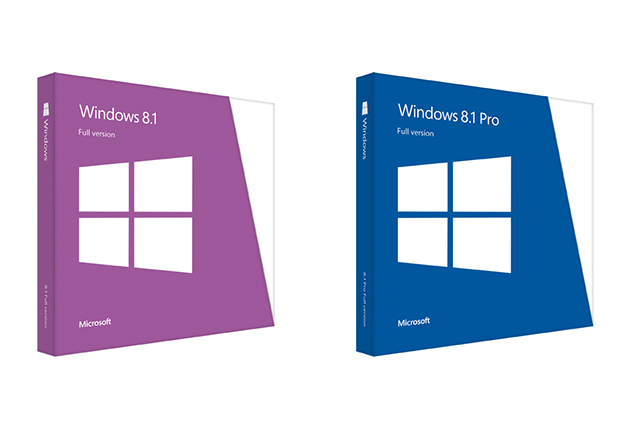
This big update will be available to current windows 8 users for free in the Windows Store on 17/10. While users who are using an older Windows OS will need to pay 119.99 US for Windows 8.1 or 199.99 US for Windows 8.1 Pro. Both versions will come with a copy of Windows 8.1 for them to use for installing virtual machines, backup and clean install.

Note that Windows 8.1 does not support Windows version before Windows 7, so if you are using Windows Vista, Windows XP or older versions and you want to upgrade your computer to Windows 8.1, you need to purchase a copy of Windows 8 and then update it through Windows Store by yourself.
Pre-order it now

Source:
Microsoft

Saturday, 21 September 2013

Welcome to McMathTechTips

Welcome to McMathTechTips! Here at McMathTechTips, we are fully committed to bring you, the viewers, the absolute finest content whether it's tech news, guides, or tutorials. Our site will mainly consist of posts on everything from computers, to programs and operating systems, and even mobile devices. We are hoping to expand this project into a full on community where viewers can contribute to each others' tech problems or tech related questions. We'll see you, in the first official topic.

We do this, so you don't mess up.